
Meetings are a normal part of working life, but nobody enjoys a meeting that could have been an email. The same goes for presentations. A good presentation can make an idea easy to understand, while a poorly organized one can lose everyone’s attention within a few minutes.
The good news is that you don’t have to manage everything manually anymore. From video meetings and collaborative whiteboards to presentation makers and AI-powered meeting assistants, digital tools can take care of many of the small tasks that make meetings and presentations stressful.
The right tool can help a team prepare faster, communicate clearly, share ideas, and keep track of what was discussed after a meeting ends.
But there is no single tool that works perfectly for everyone. A small team may need something simple for video calls, while a marketing team might need presentation design, brainstorming, screen sharing, and file collaboration in one workflow.
This guide looks at the types of meeting and presentation tools that can make everyday work smoother in 2026 and how to choose the right ones for your needs.
Why Meeting and Presentation Tools Matter

A meeting usually involves more than just talking. Someone has to schedule it, prepare an agenda, share documents, present information, take notes, and follow up on decisions.
Without a proper system, these little tasks can become surprisingly time-consuming.
Modern meeting and presentation tools bring many of these activities into one digital workflow. Instead of switching between several apps, teams can use connected tools to communicate, present information, collaborate, and organize follow-up tasks.
| Common Challenge | Useful Digital Solution |
|---|---|
| Finding a suitable meeting time | Scheduling tools |
| Remote communication | Video conferencing |
| Sharing ideas | Digital whiteboards |
| Creating slides | Presentation software |
| Taking meeting notes | AI note-taking tools |
| Sharing files | Cloud collaboration |
| Tracking decisions | Task and project tools |
| Keeping audiences engaged | Interactive presentation tools |
The goal isn’t to use more software. It is to remove unnecessary friction from the workday.
1. Video Meeting Tools for Remote Collaboration
Video conferencing has become a standard part of modern work. Teams can connect with colleagues, clients, freelancers, and partners without being in the same location.
A useful video meeting platform should make the basics easy: joining a call, sharing your screen, communicating through chat, and managing participants.
Features such as recording, captions, breakout rooms, virtual backgrounds, and meeting controls can also be helpful depending on the type of meeting.
For example, a weekly team meeting may only require video and screen sharing. A training session, on the other hand, might benefit from breakout rooms and recording.
The important thing is to match the features with the meeting instead of choosing a platform simply because it has the longest feature list.
2. Presentation Tools That Make Ideas Easier to Understand

Presentation software has come a long way from simple slide templates.
Today’s tools can help users create professional-looking presentations even if graphic design isn’t their strongest skill. Templates, visual elements, charts, animations, and collaboration features make it easier to turn information into something people can follow.
AI-assisted presentation features can also help generate an initial structure from a topic or written content. This can be useful when you’re staring at a blank slide and don’t know where to begin.
Still, automation should not replace your own judgment. A generated presentation may need editing to match the audience, tone, branding, and actual message.
A good presentation should answer three basic questions:
- What is the main idea?
- Why should the audience care?
- What should they remember after the presentation?
If the slides answer those questions clearly, they are already doing their job.
3. Digital Whiteboards for Brainstorming

Some ideas are easier to explain visually than through a standard meeting conversation.
Digital whiteboards give teams a shared space for brainstorming, planning, diagrams, mind maps, sticky notes, and workflows.
Imagine a marketing team planning a campaign. Instead of having ten people describe their ideas one after another, everyone can add ideas to the same digital board. Similar ideas can then be grouped and discussed.
This can make brainstorming feel more interactive, particularly when team members are working remotely.
Digital whiteboards are also useful for:
- Project planning
- User journey mapping
- Product brainstorming
- Team workshops
- Process diagrams
- Design discussions
- Strategy sessions
They are especially useful when a meeting needs participation rather than just one person talking.
4. AI Meeting Assistants for Notes and Summaries
Taking notes while participating in a meeting can be difficult.
You may be listening to a discussion while simultaneously trying to write down decisions, deadlines, and action items. AI meeting assistants can help by transcribing conversations, summarizing key points, and identifying follow-up tasks, depending on the tool and its features.
This can save time after a meeting because participants don’t necessarily have to reconstruct the entire conversation from memory.
However, AI-generated notes should still be reviewed. Names, context, deadlines, or technical terms can sometimes be misunderstood.
A practical workflow is simple:
Meeting → AI-generated notes → Human review → Action items → Follow-up
That keeps the convenience of automation while maintaining accuracy.
5. Scheduling Tools That Reduce Back-and-Forth
“Are you free at 3?”
“No, how about 4?”
“I have another meeting then.”
This kind of conversation may sound familiar to anyone who schedules meetings regularly.
Scheduling tools can reduce this back-and-forth by allowing people to share available time slots or coordinate calendars.
They are particularly helpful for client calls, interviews, consultations, and meetings involving people from different teams.
Before scheduling, it is also worth asking whether a meeting is actually necessary. Sometimes a short message or shared document can solve the issue without putting another event on everyone’s calendar.
6. Collaborative Documents for Meeting Preparation
A presentation rarely begins with the slides themselves. There is usually research, planning, data collection, writing, and editing involved first.
Collaborative document tools allow several people to work on the same content instead of sending different versions through email.
For example, one team member can prepare the introduction, another can add research, and someone else can review the final copy.
This approach reduces the classic problem of:
“Which version is the latest one?”
Cloud-based collaboration also makes it easier for remote teams to access documents from different locations.
7. Interactive Presentation Tools
Sometimes simply showing slides isn’t enough.
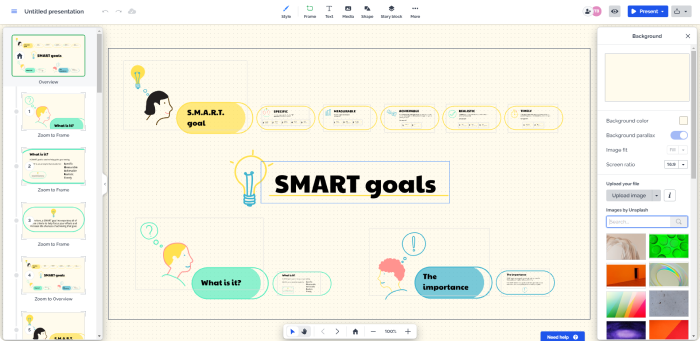
Interactive presentation tools can allow audiences to participate through polls, questions, quizzes, reactions, or other activities.
This can be especially useful for workshops, training sessions, classrooms, webinars, and large presentations.
For example, instead of asking, “Does everyone understand?”, a presenter can use a quick poll. The responses provide immediate feedback and can show whether the audience is following the topic.
Interaction doesn’t need to be complicated. Even one well-timed question can make a presentation feel more like a conversation.
8. Screen Sharing and Recording Tools
Screen sharing is useful whenever the information is easier to demonstrate than explain.
A software trainer can show how a feature works. A developer can walk through a product. A marketing professional can demonstrate an analytics dashboard. A customer-support team can explain a process visually.
Recording can also be useful when information needs to be revisited later.
For example, instead of repeating the same onboarding explanation for every new employee, a team can create a clear recorded walkthrough that employees can watch when needed.
This turns a one-time explanation into reusable knowledge.
9. How to Choose the Right Meeting or Presentation Tool
Choosing a tool can be harder than actually using one because there are so many options.
Start with your team’s actual needs.
| If You Need… | Look For… |
|---|---|
| Simple online meetings | Reliable video and audio |
| Team brainstorming | Digital whiteboard |
| Professional slides | Templates and design tools |
| Meeting summaries | Transcription and AI notes |
| Audience participation | Polls and interactive features |
| Client presentations | Screen sharing and presentation controls |
| Remote collaboration | Cloud-based editing |
| Training sessions | Recording and engagement features |
| Project follow-up | Task and collaboration integrations |
Budget matters too. Some tools have generous free plans, while advanced features may require paid subscriptions.
It is also worth checking whether the tool integrates with the software your team already uses. A tool that connects smoothly with your calendar, documents, communication platform, or project-management system can save more time than a standalone tool with dozens of extra features.
Common Mistakes to Avoid
Even the best software cannot fix a poorly organized meeting.
One common mistake is inviting too many people. If someone doesn’t need to contribute or make a decision, they may not need to attend.
Another problem is going into a meeting without a clear purpose. A short agenda can make a huge difference.
Presentations can have similar issues. Too much text, too many animations, tiny fonts, and overcrowded slides can make useful information difficult to absorb.
Try keeping each slide focused on one main idea.
And don’t forget the follow-up. A meeting isn’t truly finished if nobody knows what happens next.
Simple Tips for Better Digital Meetings
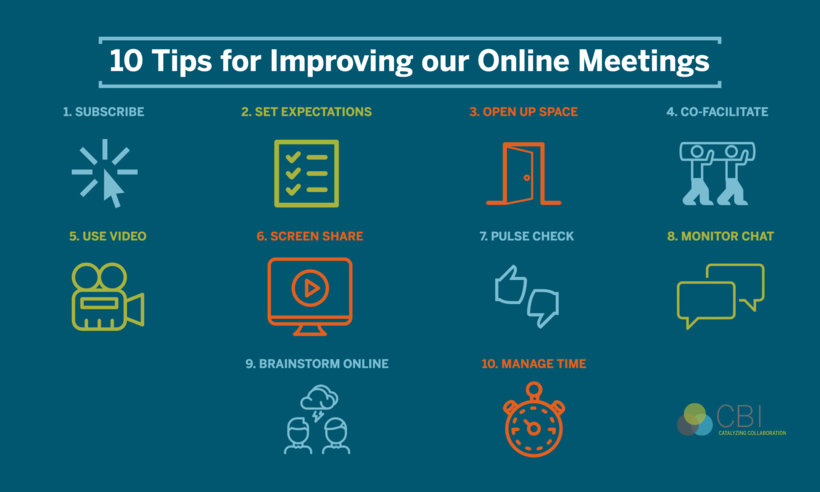
A few small habits can improve meetings without requiring another app.
Start with a purpose.
Know what the meeting needs to accomplish.
Share important material beforehand.
If participants need to review data or documents, give them time to look at them.
Keep presentations focused.
Slides should support what you’re saying rather than becoming a wall of text.
Leave space for questions.
A presentation should allow people to clarify important points.
Record decisions and responsibilities.
Everyone should know what was decided and who is responsible for the next step.
End with clear action items.
A simple list of tasks and deadlines can prevent confusion later.
The Human Side of Digital Meetings
Technology can make meetings faster, but it cannot replace good communication.
A team can have the best video platform and still have unproductive meetings if nobody listens to one another. Similarly, a beautiful presentation is not automatically a good presentation.
Good digital communication still depends on basic human skills: listening, explaining clearly, asking questions, respecting other people’s time, and knowing when to stop talking.
The best tools simply make those habits easier to practice.
What Meeting and Presentation Tools Can Look Like in 2026

The direction of workplace technology is moving toward more connected and automated workflows.
Instead of using separate tools for every small task, users increasingly expect platforms to work together. AI can assist with preparation and summaries, collaboration tools can keep documents and conversations connected, and presentation software can help turn ideas into visual content faster.
But convenience should not come at the expense of clarity or privacy.
Before adopting a new tool, consider what information it collects, how it handles recordings and documents, and who has access to shared content.
Ultimately, the smartest meeting setup is not the one with the most technology. It is the one that helps people spend less time dealing with logistics and more time actually doing meaningful work.

Best Meeting & Presentation Tools for Better Work in 2026
Meetings are a normal part of working life, but nobody enjoys a meeting that could…
Best Tools for Developers in 2026: Top Software & Ratings
Let’s be honest for a second. If you spend five minutes on Tech Twitter, Reddit,…

Best Team Collaboration Tools in 2026 for Better Teamwork
Let’s be honest about the modern workplace. “Working together” sounds great on paper until you…

Best Productivity Tools 2026: Compare Top Apps & Features
The user is asking for “fully huamnsed blog content and add human words” on top…

10 Best Marketing Tools for 2026: Boost Your Online Growth
Let’s be completely honest about marketing tools: having more software won’t magically get you more…

10 Best Time Tracking Tools for Better Focus and Productivity in 2026
We’ve all experienced that specific 5:00 PM panic. You spent eight straight Time hours sitting…