Staying productive in a world full of notifications, deadlines, meetings, and digital distractions can be challenging. Whether you are a student managing assignments, a professional handling daily tasks, a freelancer working with clients, or a business owner coordinating a team, the right productivity tools can help you stay organized and use your time more effectively.
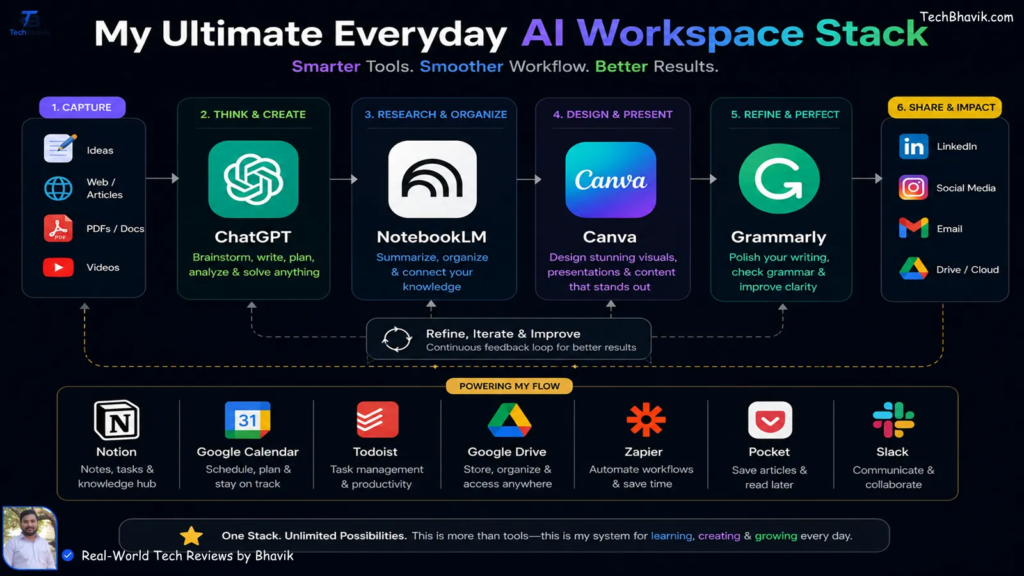
The best productivity tools in 2026 help simplify everyday work by bringing tasks, notes, calendars, documents, communication, and automation into more manageable workflows. Instead of remembering every deadline or switching between countless applications, you can use digital tools to organize priorities, track progress, and reduce repetitive work.
However, productivity is not about installing as many apps as possible. It is about finding tools that solve your specific problems and building habits that help you get meaningful work done.
This guide explores popular productivity tools, their main uses, essential features, and practical tips for choosing the right options for work, study, and everyday life.
What Are Productivity Tools?

Productivity tools are applications, websites, and software solutions that help people organize tasks, manage time, collaborate with others, create content, and complete work more efficiently.
Some tools focus on a single task, such as maintaining a to-do list. Others combine project management, documents, team communication, reporting, and automation in one workspace.
For example, a student might use a calendar to track examination dates, while a marketing team might use project management software to coordinate campaigns and monitor deadlines.
Common Types of Productivity Tools
| Tool Category | Main Purpose | Example Tools |
|---|---|---|
| Task Management | Organize tasks and deadlines | Todoist, Trello |
| Project Management | Coordinate projects and teams | Asana, ClickUp |
| Notes and Documentation | Store ideas and information | Notion, Evernote |
| Calendars and Scheduling | Plan meetings and activities | Google Calendar |
| Communication | Support team discussions | Microsoft Teams, Slack |
| Time Tracking | Understand how time is spent | Toggl Track, Clockify |
| Automation | Reduce repetitive manual work | Zapier |
| Writing Assistance | Improve writing and editing | Grammarly |
The best category depends on the problem you want to solve. A simple task manager may be enough for personal planning, while a growing business may need shared projects, reporting, and automation.
Why Productivity Tools Matter in 2026
Modern work often involves several projects, digital platforms, messages, and deadlines at the same time. Without an organized system, important tasks can easily get lost among smaller activities.
Productivity tools provide a central place to capture responsibilities and monitor progress.
Key Benefits of Productivity Software
Better organization: Keep tasks, notes, documents, and schedules in structured locations.
Improved time management: Set deadlines, plan work sessions, and identify priorities.
Easier collaboration: Share updates, assign responsibilities, and coordinate team activities.
Less repetitive work: Automate routine actions when suitable integrations are available.
Clearer progress tracking: Review completed work and identify tasks that need attention.
More consistent planning: Use recurring reminders and reusable templates for regular activities.
These benefits depend on how the tools are configured and used. Software can support good work habits, but it cannot replace clear priorities, communication, or decision-making.
Best Productivity Tools to Explore in 2026
There is no single application that works best for everyone. The following tools cover different productivity needs and can be evaluated according to your workflow.
1. ClickUp for Project and Task Management
ClickUp combines task management, project planning, documentation, goals, and other work-management features in one platform.
It can be useful for teams that need to coordinate several projects or for individuals who prefer keeping different work activities in a shared workspace.
Useful features may include:
- Task assignments and deadlines
- Project views and progress tracking
- Shared documents
- Team collaboration
- Workflow automation and AI features, depending on the plan
ClickUp may be suitable for businesses and project teams, although users should consider its learning curve before adopting it across an entire organization.
Official website: https://clickup.com/
2. Notion for Notes and Knowledge Management
Notion is a flexible workspace for notes, documents, databases, knowledge bases, and project organization.
Students can use it to organize study notes, while professionals can create content calendars, meeting records, project trackers, and internal documentation.
Its flexibility is useful when users want to build a personalized system. However, creating an elaborate workspace can take time, so it is often better to start with a simple structure.
Official website: https://www.notion.com/
3. Todoist for Daily Tasks
Todoist focuses on personal and team task management. It helps users capture tasks, organize projects, set due dates, and manage recurring responsibilities.
It can be especially useful for people who want a straightforward way to track everyday work without setting up a complicated project system.
Best for: Personal to-do lists, recurring tasks, reminders, and simple project planning.
Official website: https://todoist.com/
4. Trello for Visual Planning
Trello uses boards, lists, and cards to organize work visually. Users can move tasks between stages, such as “To Do,” “In Progress,” and “Completed.”
This format can work well for content production, marketing campaigns, event planning, and personal projects.
For example, a content team could create a board showing each article’s status, assigned writer, deadline, and publishing progress.
Official website: https://trello.com/
5. Google Calendar for Scheduling
Google Calendar helps users schedule meetings, organize events, and manage time-based commitments.
It can be used for work meetings, examination schedules, appointments, content deadlines, and personal routines.
A useful approach is to combine a task list with calendar time blocks. The task list records what needs to be done, while the calendar reserves time to complete important work.
Official website: https://calendar.google.com/
6. Microsoft Teams for Team Collaboration

Microsoft Teams supports workplace communication through chats, meetings, calls, and collaboration features that connect with other Microsoft services.
It can help teams coordinate discussions and reduce the need to manage every conversation through separate communication channels.
Before adopting it, consider your organization’s existing software, security requirements, and collaboration habits.
Official website: https://www.microsoft.com/microsoft-teams/
7. Toggl Track for Time Tracking
Toggl Track helps individuals and teams record the time spent on tasks and projects.
Freelancers may use time reports to understand billable hours, while businesses can review how much time different projects require.
Time tracking is most useful when the collected information helps improve planning. Tracking every minute without reviewing the results can create unnecessary work.
Official website: https://toggl.com/track/
8. Zapier for Workflow Automation
Zapier connects supported applications to automate actions between them. For example, an automation might send a notification when a form is submitted or transfer information between connected services.
Automation can reduce repetitive tasks, particularly when the same sequence happens regularly.
Before enabling a workflow, test it carefully and review permissions, data handling, usage limits, and the conditions that trigger each action.
Official website: https://zapier.com/
9. Grammarly for Writing Assistance
Grammarly offers writing assistance that can help users review grammar, spelling, clarity, and tone. Depending on the product and plan, additional writing features may be available.
It can support emails, reports, articles, and other professional writing tasks. Users should still review suggestions carefully, especially when writing requires technical accuracy or a specific brand voice.
Official website: https://www.grammarly.com/
Productivity Tools Compared at a Glance
The following table summarizes the main use case for each tool. It is a practical starting point rather than a definitive ranking.
| Tool | Best Use | Suitable For |
|---|---|---|
| ClickUp | All-in-one work management | Teams and project managers |
| Notion | Notes and organized knowledge | Students and professionals |
| Todoist | Daily task lists | Individuals and freelancers |
| Trello | Visual task boards | Small teams and creators |
| Google Calendar | Scheduling and time blocking | Everyday users and teams |
| Microsoft Teams | Workplace communication | Organizations |
| Toggl Track | Time tracking | Freelancers and agencies |
| Zapier | Connecting apps and automating workflows | Businesses and power users |
| Grammarly | Writing review and editing | Writers and professionals |
Pricing, plan limits, integrations, and features can change. Check each provider’s official website before selecting a paid plan.
How to Choose the Right Productivity Tool
A popular tool is not automatically the right choice. Start by identifying the part of your workflow that causes the most difficulty.
Identify Your Main Challenge
Ask yourself what you want to improve. Do you forget deadlines? Spend too much time searching for information? Struggle to coordinate team members? Repeat the same manual actions every day?
Your answer will help narrow the options.
Match the Tool to Your Needs
| Your Challenge | Tool Type to Consider |
|---|---|
| Forgetting daily tasks | Task manager |
| Missing meetings or deadlines | Calendar and reminders |
| Losing notes and information | Notes or knowledge-management tool |
| Coordinating a team project | Project-management platform |
| Understanding where time goes | Time tracker |
| Repeating the same digital actions | Automation tool |
| Improving written communication | Writing assistant |
Check Ease of Use and Cost
Before committing to a platform, check whether it offers the features you need, works on your devices, integrates with your existing applications, and fits your budget.
Free plans can be a useful way to test a workflow before upgrading. Review usage limits, paid features, privacy terms, and cancellation conditions before purchasing a subscription.
How to Build a Simple Productivity System
You do not need ten different applications to become more organized. A small, well-maintained system can be more effective than a large collection of disconnected tools.
Try this basic approach:
Step 1: Capture tasks. Record responsibilities in one task manager instead of relying on memory.
Step 2: Prioritize. Identify the two or three tasks that matter most for the day.
Step 3: Schedule important work. Reserve time for tasks that require focus.
Step 4: Organize information. Keep notes and project documents in predictable locations.
Step 5: Review progress. At the end of the day, update completed tasks and prepare for tomorrow.
Step 6: Automate carefully. Once a repetitive process is clear, consider whether automation can reduce manual effort.
This system works best when you review it regularly and remove features or tools that do not add value.
Productivity Tips for Students, Professionals, and Businesses

Different users have different responsibilities, so productivity systems should reflect their needs.
For Students
Use a calendar for examination dates, a task manager for assignments, and a notes application for study material. Break large projects into smaller tasks with realistic deadlines.
For Professionals
Organize work by project, schedule focused time, keep meeting notes, and clarify responsibilities with colleagues. Avoid checking notifications continuously when a task requires concentration.
For Freelancers
Track project deadlines, client communication, deliverables, and billable time where appropriate. Keep agreements and important documents organized.
For Business Owners
Use shared project boards, repeatable workflows, clear task ownership, and appropriate reporting. Introduce new tools gradually so employees understand how they fit into existing processes.
Common Productivity Mistakes to Avoid
Even useful software can become a distraction when it is poorly managed.
- Using too many apps: Duplicated task lists and disconnected systems create extra work.
- Over-customizing: Spending hours designing dashboards can delay the actual work.
- Ignoring notifications: Too many alerts can interrupt concentration.
- Automating unclear processes: Automation can repeat mistakes faster if the workflow has not been tested.
- Tracking without reviewing: Data is only useful when it informs decisions.
- Expecting instant results: Productivity improves through consistent habits, not software alone.
A useful rule is to keep your system simple enough that you will continue using it on busy days.
How AI Is Changing Productivity Tools
AI features are increasingly being added to productivity platforms. Depending on the tool, they may help summarize notes, draft content, organize information, suggest task priorities, or assist with repetitive workflows.
These capabilities can save time when used for suitable tasks, but AI-generated results still require review.
For example, an AI assistant can create a first draft of a meeting summary, but a team member should verify important decisions, names, deadlines, and assigned responsibilities before sharing it.
When using AI tools, avoid submitting confidential or sensitive information unless the service’s data-handling practices and your organization’s policies permit it.
Best Productivity Tools 2026: Work Smarter & Save Time
Staying productive in a world full of notifications, deadlines, meetings, and digital distractions can be…
Best Free Trial Tools 2026: Try Premium Software for Free
Paying for software before knowing whether it actually works for you can be frustrating. You…

Best Meeting & Presentation Tools for Better Work in 2026
Meetings are a normal part of working life, but nobody enjoys a meeting that could…

Best Tools for Developers in 2026: Top Software & Ratings
Let’s be honest for a second. If you spend five minutes on Tech Twitter, Reddit,…

Best Team Collaboration Tools in 2026 for Better Teamwork
Let’s be honest about the modern workplace. “Working together” sounds great on paper until you…

Best Productivity Tools 2026: Compare Top Apps & Features
The user is asking for “fully huamnsed blog content and add human words” on top…